
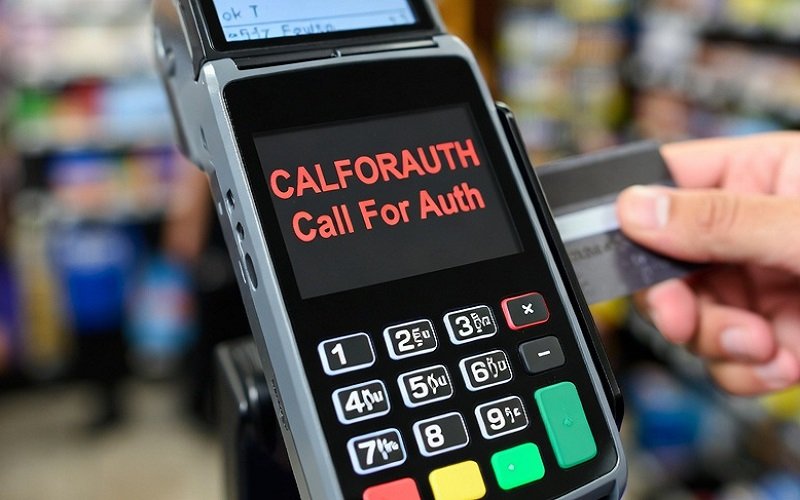
You’ve seen it pop up on the register screen mid-transaction: CALFORAUTH. Customers get frustrated, lines back up, and you’re left wondering what went wrong. This common payment error, short for “Call for Authorization,” appears on terminals at stores like Dollar General and other retailers. It signals that the card issuer needs extra verification before approving the purchase.
Retail associates deal with this daily. Understanding it saves time, reduces stress, and helps you handle situations smoothly. This guide explains the error, why it happens, and exactly what to do.
What “CALFORAUTH” Actually Means
CALFORAUTH is a response code from the credit or debit card processor. It tells the terminal (and you) to contact the card issuer’s authorization center for manual approval.
Unlike a straight “Declined,” this code often means the bank flags the transaction as suspicious or needs confirmation. It’s not always a hard no — many resolve quickly.
In practice, at Dollar General and similar chains, cashiers see it frequently during chip reads, PIN entries, or contactless taps. One Reddit thread from DG employees showed it confuses new hires and leads to awkward customer conversations.
Common Causes of the CALFORAUTH Error
Several triggers lead to this code. Here are the most frequent ones with real-world examples:
- Card Locked by the Owner: Many banks let customers lock cards via apps for security. A locked card triggers CALFORAUTH. One DG worker noted Chase cards often show this when the app lock is active. Customers simply unlock it in their phone app and retry.
- Fraud or Security Flags: Unusual activity (large purchase, new location, or travel) prompts the issuer to verify. Banks err on the side of caution.
- Network or Terminal Glitches: Poor internet at the store can interrupt authorization. A district manager at Dollar General explained that waiting 30–60 seconds and retrying often fixes it as the connection stabilizes.
- PIN Bypass or Credit/Debit Mismatch: Running as credit when the card expects debit (or vice versa) can trigger it. Chip read failures also produce generic declines that display as CALFORAUTH.
- Bank-Side Holds or Limits: Low balance, daily limits exceeded, or temporary holds from recent activity.
Actionable Tip: Track patterns in your store. If it hits mostly on weekends or with certain cards, it may point to connectivity issues rather than customer problems.
How to Fix CALFORAUTH Quickly: Step-by-Step
Don’t panic when it appears. Follow these steps:
- Stay Calm and Communicate: Tell the customer politely, “This is a bank verification message. It often clears with a quick retry or app check.”
- Retry the Transaction: Suggest tapping instead of inserting, or running as credit. Many resolve on the second try.
- Check the Card App: Ask if they have mobile banking. Unlocking the card takes seconds.
- Manual Authorization (If Needed): For persistent cases, call the number on the back of the card. Provide transaction details and get a verbal authorization code. Enter it manually on the terminal.
- Alternative Payment: Offer cash, another card, or split the purchase if limits are the issue.
Real Example: A Dollar General associate dealt with a frustrated customer who insisted it was the store’s fault. After retrying, the customer admitted her card was locked in the app. The transaction went through, and the line moved.
Statistics from payment processors show that 20–30% of declines stem from preventable issues like locks or temporary flags — not insufficient funds. Quick troubleshooting converts many of these into sales.
Preventing CALFORAUTH Errors in Your Store
Proactive steps cut down occurrences:
- Train Staff: Role-play common scenarios. Teach new hires the difference between hard declines and verification codes.
- Maintain Equipment: Clean card readers regularly. Ensure stable internet — many stores use backups or boosters during peak hours.
- Customer Education: Post subtle signs about mobile banking or contactless options.
- Monitor Patterns: Use your POS reports to spot frequent issues with specific networks or times.
One case study from retail forums: A store with chronic connectivity problems reduced CALFORAUTH incidents by 40% after upgrading their router and training staff on retry protocols.
When to Escalate or Call for Help
If retries fail and manual auth isn’t an option:
- Contact your payment processor support.
- Advise the customer to call their bank directly.
- Document the incident for your manager, especially if equipment-related.
Rarely, it signals a broader system outage. Check with neighboring stores or your manager’s group chat.
FAQ:
Is CALFORAUTH always the customer’s fault?
No. While often card-related, network drops or terminal issues play a role too.
Can I run the card anyway?
Retry yes, but don’t force it. Persistent errors need bank contact.
Does it mean the card is stolen?
Not usually. It’s a verification step, not a fraud confirmation.
Why do certain cards trigger it more?
Banks like Chase have stricter real-time monitoring.
Will this affect the customer’s credit?
No. It’s a standard authorization check.
Wrapping Up: Master the CALFORAUTH Error
The CALFORAUTH error is a common hurdle in retail payment processing, but it’s manageable with the right knowledge. It usually stems from card locks, security flags, or minor technical hiccups — and most resolve without a full bank call.
By understanding the causes, following quick fixes, and preparing your team, you turn potential frustrations into smooth transactions. Next time it pops up, you’ll handle it like a pro and keep customers happy.
Have you encountered CALFORAUTH recently? Share your experience in the comments or check your store’s payment logs for patterns. For more retail payment tips, explore guides on credit card declines and POS troubleshooting. Your feedback helps other associates — drop a note below!